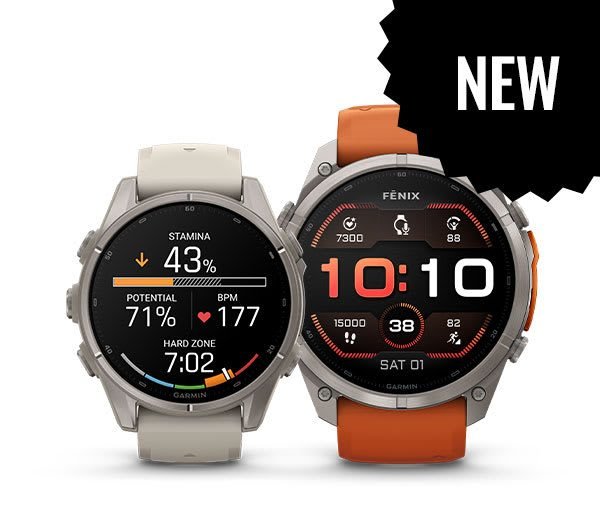
Outdoor watches face a tough visual challenge. You need to read your pace in harsh noon glare. You must also check elevation markers on shaded trails and review sleep charts in the dark. The Garmin Fenix 8 tackles this challenge by rethinking its display hardware from the ground up. Before, buying an endurance tracker meant accepting dull screens. They looked dated compared to modern smartwatches. This watch removes that trade-off. It offers two different screen options for different habits. Whether you run in parks or hike remote trails, the screen shapes your view. It affects how you read pacing alerts and vital health metrics. We will break down brightness, outdoor visibility, and battery life for each choice.
Screen Brightness and Outdoor Visibility Performance
Garmin offers two screen types: transflective Memory-in-Pixel (MIP) and AMOLED (a bright, modern screen). The standard MIP panel relies on ambient light rather than fighting against it. Sunlight bounces off the screen. This makes text, pace splits, and maps look sharper in bright sun. If you spend weekends hiking on exposed mountain trails, this screen provides an effortless view. It does this without draining your battery.
The AMOLED version uses millions of tiny pixels. These pixels make their own light. The screen reaches 1,000 nits of brightness. A nit is a measure of light power. That high ceiling allows the panel to cut through midday reflections with surprising force. In dense trees or a dim gym, the rich colors make map arrows stand out.
Low-light clarity varies noticeably between both choices. The MIP build uses a built-in LED backlight for dusk outings. To turn it on, you must tap a button or flick your wrist. In contrast, the AMOLED version automatically dims its screen to a gentle glow. This preserves your night vision during late evening runs. During my testing in different weather, the light sensor reacted almost instantly. It adjusts quickly when you step from a shaded garage into direct sun.
Display Impact on Battery Life and Daily Wear
Screen behavior controls power consumption more than almost any other component inside the watch. Max backlight brightness drains power fast. This is true during long GPS workouts. You can save battery by dropping the backlight to twenty percent. This remains bright enough for evening walks.
Adjusting the display timeout makes another major difference in power draw. It controls how long the screen stays on after a wrist tilt. A four-second timer saves power when your hands rest on a steering wheel. A fifteen-second timer will drain your daily battery twice as fast.
The always-on display (AOD) uses the most power on the AMOLED watch. Keeping the screen on all day draws constant power. This feature mimics a normal watch, but cuts battery life to under a week. Turn off AOD and use wrist gestures to get over two weeks of battery. The MIP solar watch avoids this. Its screen reflects light without drawing active power.
Garmin Fenix 8 AMOLED vs Solar MIP Display Options
Choose the AMOLED for rich visuals, or the MIP for long-term survival. Both versions feel very different to wear during outdoor workouts. The AMOLED feels like a smart computer. The MIP feels like a tactical tool.
The AMOLED screen has a sharp 454 x 454 resolution. It shows clear details. Map lines look smooth, and heart rate graphs show bright color detail. Crisp text prevents eye strain when reading maps or reading work notifications. This makes the watch a great daily tool for casual social settings.
The MIP edition offers amazing battery life and solar charging on the bezel. The 280 x 280 screen looks a bit blocky. Still, it uses almost no power. The solar ring absorbs sunlight while you run. It charges your watch during the day. Guides and ultra-runners who go weeks without power need this stamina. Reliability matters more than colors when you travel far from electrical outlets.
Garmin Fenix 8 Display Specifications Comparison
| Feature | Garmin Fenix 7 Pro Sapphire Solar | Garmin Fenix 8 Standard | Garmin Fenix 8 Pro |
|---|---|---|---|
| Screen Size | 1.3 inches (33.02 mm) | 1.3 inches (33.02 mm) | 1.4 inches (35.56 mm) |
| Display Type | Transflective MIP | Enhanced Transflective MIP | AMOLED |
| Resolution | 260 x 260 pixels | 280 x 280 pixels | 454 x 454 pixels |
| Peak Brightness (estimated) | ~150 nits (backlight) | ~200 nits (backlight) | ~1,000 nits |
| Touchscreen | Yes | Yes | Yes |
Sunlight Visibility and Brightness Performance
The Fenix 8 Standard boosts contrast between background pixels and dark text. Older panels often looked washed out under midday rays. The updated screen now keeps small numbers clear against light map backgrounds. A boosted 200-nit backlight helps you see in low light. Outdoor runners can verify pace metrics effortlessly while sprinting along bright coastal paths.
The Fenix 8 Pro relies on raw illumination power to dominate harsh ambient reflections. An ambient light sensor pushes the screen to 1,000 nits in bright sun. Anti-reflective coatings on the sapphire crystal prevent glare on bright afternoons. Check current pricing on Garmin’s site to compare models before buying.
Display Technology, Color, and Touch Response
Both models feature a responsive touchscreen. It works through moisture or damp gloves. Garmin pairs this screen with five physical side buttons. You can lock the touch screen during heavy rain or swims. Navigating trail maps is fluid because the processor updates graphics quickly.
Color presentation remains the primary dividing line between the two editions. The AMOLED screen shows rich hues. These make workout charts easy to read. The MIP screen uses a simple 64-color palette. It looks dull but functional. The subdued colors work fine for outdoor navigation. However, users used to vibrant phone screens may find the indoor look uninspiring.
Pros and Cons: Garmin Fenix 8 Screen Review
Each display format brings clear benefits alongside distinct operational trade-offs for outdoor athletes.
Pros of the Garmin Fenix 8 Screen
- Rich Color Saturation: AMOLED shows deep colors and dark blacks. This makes small lines easy to follow.
- Great Sunlight Performance: The MIP screen uses sunlight to show data. It works without drawing battery power.
- Dual Controls: The touch screen and physical buttons work together. This gives you control in any weather.
- Sapphire Protection: Strong glass prevents scratches from gravel, rocks, and gym weights.
Cons of the Garmin Fenix 8 Screen
- Always-On Battery Drain: Keeping the AMOLED screen lit all day cuts battery life to under a week.
- Dull Indoor MIP Screen: The MIP screen looks dark indoors. You must use the backlight often.
- Glass Glare: The glossy AMOLED screen can catch reflections when tilted away from your face.
- Burn-In Risk: Static screens on high brightness can cause burn-in after years of use.
Frequently Asked Questions
Can you see the AMOLED display clearly under direct midday sunlight?
Yes. The screen hits 1,000 nits while anti-reflective glass cuts glare. Sensors boost brightness as soon as you step outside. Data points remain sharp even under direct desert sunshine.
How much does keeping the screen at maximum brightness drain the battery?
Using maximum brightness cuts your battery life by thirty to forty percent. Lowering the timeout interval to four seconds helps conserve battery power. Using moderate brightness settings still yields well over seven days between plug-in cycles.
Does the built-in LED flashlight work differently from the screen light?
Yes. Garmin builds a physical LED light into the top edge of the watch. It works like a headlamp with four brightness levels and a red beam. It functions completely independently from the display glass.
Is the display blinding in a dark bedroom or tent at night?
Red Shift mode turns screen text into soft amber, orange, or red shades. It dims the screen so looking at stats won’t ruin your night vision. You can set this feature to trigger automatically based on sleep schedules.
Should outdoor athletes pick the Solar MIP screen over the bright AMOLED version?
Endurance runners taking long trips without power should choose the solar MIP. Everyday runners who want clear gym metrics and vibrant maps will prefer the AMOLED. For most buyers, the modern interface easily justifies the slightly shorter battery life.
Final Verdict: Is the Fenix 8 Screen Worth It?
Garmin resolved the biggest complaint about its high-end watches by offering both screen types. You no longer have to accept a dull screen just to get a tough watch. The AMOLED edition adds smartphone-grade brightness to a body tough enough for mountaineering. Meanwhile, the solar MIP version still serves hardcore expedition racers.
These hardware upgrades command a premium investment. As of October 9, 2026, prices start around $999 and rise to $1,199 for titanium models. Owners of older Fenix models might hesitate unless they want a brighter screen. If you are upgrading from a basic tracker, the better screen is a huge leap.
Here is how to select your preferred build: