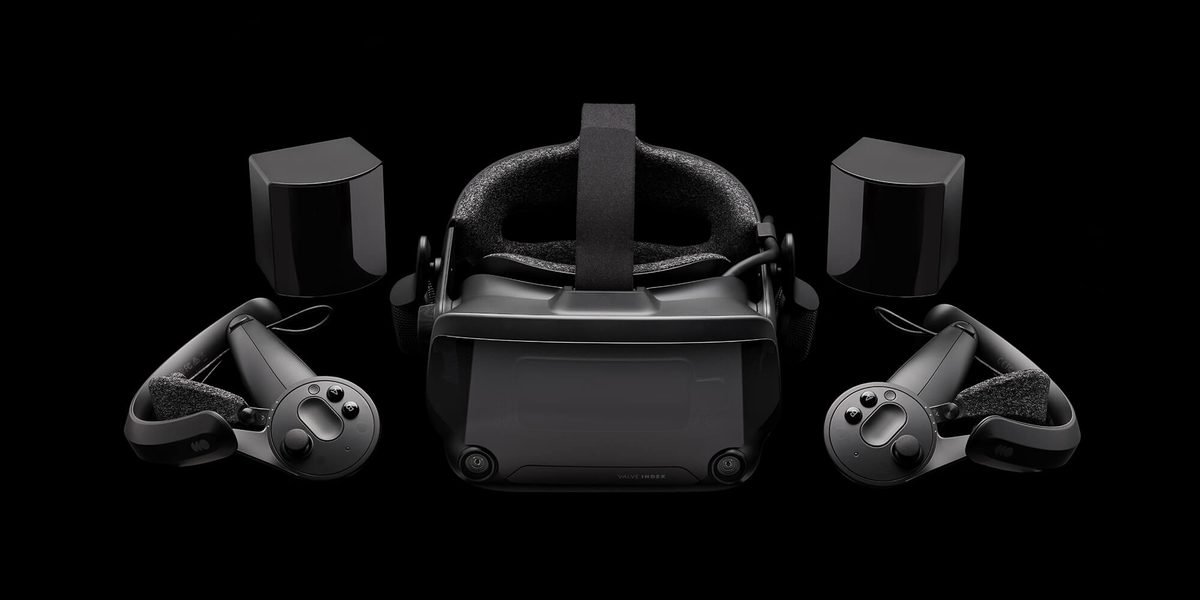
Putting on the Valve Steam Frame reveals how surprisingly light modern virtual reality gear can feel. For years, players had to choose between tethered cords or weak mobile graphics. Valve solved that dilemma by packing high-resolution displays and processing hardware directly into a wire-free design. This standalone headset handles demanding games natively without relying on a bulky desktop computer. Sharp visual clarity and low latency (the tiny delay between hand movements and the screen) impress immediately. However, battery endurance creates clear trade-offs. The headset typically sells around $799 as of September 16, 2026. It targets serious gamers who want top-tier performance without sitting at a desk. Here is how Valve’s ambitious hardware holds up under daily play.
Valve Steam Frame Overview and Standalone Architecture
Unboxing the Valve Steam Frame reveals a refined piece of hardware built for fast setup. Inside the box, you receive the visor, two refreshed Motion controllers, a charger, and a protective case. Valve balanced the weight carefully. This keeps the headset steady during quick movements.
I was surprised by how much power Valve packed into this standalone design. At the core is a custom APU, or Accelerated Processing Unit. This chip combines the main processor and graphics engine. This layout saves power. It also runs cool, and a quiet fan manages the heat easily. The chip is tuned for portable play. It delivers crisp graphics without any wires.
The software experience feels smooth and natural. It runs a custom SteamOS built for spatial 3D interfaces. Turning on the visor brings up a floating dashboard that mirrors your existing PC library. You can browse titles or tweak system settings using simple hand gestures. Loading times stay short, and switching between applications remains fluid.
Operating without a computer involves obvious compromises. Demanding games drain the battery quickly during standalone play. This limits your unplugged sessions. Base models typically cost around $799 as of September 16, 2026. Confirm current pricing on the manufacturer’s site before buying.
Display Quality, Optics, and Ergonomics
Visual clarity stands out as one of the strongest features on this headset. The unit features twin OLED screens. These deliver pitch-black tones and rich, vibrant colors. Each eye gets a sharp 2560 by 2560 screen that eliminates pixel grid patterns completely. It uses thin pancake lenses. These fold light inside a small chamber to keep the visor lightweight.
The FOV, or field of view, spans 110 degrees. This is the total area you can see. This wide view keeps you immersed. You will not feel like you are looking through a pipe. Fast panel response times and a high refresh rate keep motion smooth. This refresh rate reaches 120Hz, meaning the screen redraws the image 120 times each second. A dial adjusts the IPD, or pupil distance. This helps you align the lenses easily.
Long gaming sessions demand effective comfort features. Instead of pushing hard against your cheekbones, the headset shifts its mass across a thick top band. The rear strap includes a dense cushion that hugs your crown firmly without pinching. A breathable fabric face mask absorbs sweat while venting heat away from your skin. That balanced frame minimizes neck strain during extended play.
Valve Steam Frame Hardware Specs Comparison
| Feature | Valve Steam Frame | Meta Quest 3 | Apple Vision Pro |
|---|---|---|---|
| Display Type | Dual OLED Micro-displays | Dual LCD Panels | Micro-OLED Displays |
| Resolution Per Eye | 2560 x 2560 pixels | 2064 x 2208 pixels | 3660 x 3200 pixels |
| Max Refresh Rate | 120 Hz | 120 Hz | 100 Hz |
| Headset Weight | 480 grams | 515 grams | 600 grams |
| Average Battery Life | 2-3 hours | 2-2.5 hours | 2 hours |
| Estimated Base Price | Around $799 as of September 16, 2026 | Around $499 as of September 16, 2026 | Around $3499 as of September 16, 2026 |
Standalone Gaming Performance and SteamOS VR Benchmarks

Running complex virtual reality games directly on mobile hardware requires clever background tuning. The system handles demanding titles at a steady 90 frames per second without stuttering. Frame pacing measures how evenly images render. It stays flat, preventing jitter during action scenes.
Internal cooling handles extended workloads without dropping performance. Thermal throttling occurs when a hot processor slows down to lower internal heat output. The active fan maintains full speed during an hour of play. You will not lose frames.
To keep performance responsive, SteamOS uses dynamic rendering scaling during intense scenes. Distant background textures might soften slightly in busy environments. But foreground objects remain crisp and detailed.
- Rhythm and Casual Titles: Locks into a fluid 120Hz output with virtually zero dropped frames.
- Action Games: Maintains a stable 90Hz native speed with detailed shadow effects.
- Demanding 3D Environments: Dynamically adjusts output between 72Hz and 90Hz to protect overall smoothness.
Mobile hardware trade-offs are modest if you want total freedom from cables. Confirm current pricing on the manufacturer’s site to compare storage options as of September 16, 2026.
Wireless PC VR Streaming and Tracking Precision
Connecting wirelessly to a desktop PC performs remarkably well over a clean home network. Linking to your rig over Wi-Fi 6E keeps latency below 12 milliseconds. Quick turns feel instantaneous, preventing the disorientation that wireless lag often causes. Connecting your host computer to your router with an Ethernet cable provides the most consistent video stream.
The headset uses inside-out tracking. Four cameras on the front shell map your room automatically. You do not need external laser sensors mounted on your walls. Controller tracking remains precise during fast movements. It works well even in dim lighting.
The controllers feature touch-sensitive thumb pads and advanced haptics. These vibration motors simulate real physical textures. Grabbing objects or pulling virtual triggers produces distinct tactile feedback in your hands.
- Streaming Latency: Averages 10-12 milliseconds over dedicated 6 GHz channels.
- Tracking Setup: Four wide-angle optical cameras map room boundaries instantly.
- Controller Battery: Powered by standard AA batteries lasting nearly 25 hours.
- Passthrough Video: High-definition color cameras display your physical room clearly.
Battery Life, Thermals, and Audio Fidelity

Battery capacity remains the primary limitation for portable VR hardware. The internal battery lasts roughly 2 to 2.5 hours when running graphics-heavy titles natively. Streaming games wirelessly from a PC extends battery life to 3.5 hours. The headset processes less data. The headset charges using a standard USB-C port. This is a common, modern cable connection. Plugging in an external power bank easily doubles your play time.
Thermal design keeps heat away from your skin. The intake fan draws cool air through bottom vents and expels warm air out the top edge. This airflow prevents the lenses from fogging up during active gaming sessions. The top exhaust port gets warm, but frame rates remain steady without thermal slowdowns.
Off-ear speakers hover just above your ears to deliver open spatial audio. Directional sounds feel like they originate from specific spots in your room. Midrange notes and game dialogue sound crisp, though deep bass feels light compared to over-ear headphones. Audio leaks slightly into your room if you turn the volume above 70 percent.
Valve Steam Frame Pros and Cons
In daily use, Valve clearly chose open software and precise tracking over a cheap price. Weighing these pros and cons helps clarify if this headset fits your gaming needs.
Pros:
- Open SteamOS Ecosystem: Direct access to your existing library without locked software stores or hidden subscription fees.
- Precise Inside-Out Tracking: Built-in cameras track hand movements accurately across large spaces without room sensors.
- Off-Ear Spatial Audio: Hovering speakers deliver realistic directional sound without trapping heat around your ears.
- Expandable Memory Slot: MicroSD storage expansion lets you save dozens of large games without deleting titles.
Cons:
- Modest Battery Life: Heavy graphical workloads limit mobile sessions to roughly two hours before needing a charger.
- Higher Initial Investment: Base models cost around $799 as of September 16, 2026. Verify current prices before buying.
- Bulky Controller Design: Rigid tracking rings on the handles require extra space in travel bags.
- Audible Fan Noise: Cooling fans spin faster under heavy graphical loads, producing a soft hum in quiet rooms.
Frequently Asked Questions
How long does the battery last during standalone play?
The built-in battery provides 2-3 hours of run time. Connecting a power bank extends sessions past four hours.
Can you play your existing Steam library on the Valve Steam Frame?
Yes. You can stream titles from your PC or download supported native games. Wireless streaming works best with Ethernet.
How much does the headset cost in 2026?
The base model costs around $799 as of September 16, 2026. The OLED screen justifies the price. Check current prices before buying.
Is the Steam Frame comfortable if you wear glasses?
The cushion provides enough room for most glasses without pressing the lenses. Side cutouts prevent pinching.
Do you need a gaming PC to use this headset?
No PC is required. You can download and play games directly on the device.
Final Verdict: Is the Steam Frame Worth Buying in 2026?
The Valve Steam Frame balanced wireless freedom with access to your PC library. Valve built a well-rounded headset that pairs impressive native graphics with excellent desktop streaming performance. It costs more than budget options. However, the open OS, high clarity, and comfort justify the price.
At around $799 as of September 16, 2026, it offers great value for active Steam users. Casual buyers seeking simple mobile puzzle games might prefer cheaper entry-level alternatives. But they will miss out on community mod support and crisp visual rendering.
Final Score: 8.5 / 10 (Recommended)
Here is a quick summary to help you decide:
- Who should buy this: PC gaming fans, VR enthusiasts, and players who prefer open software.
- Who should look elsewhere: Shoppers on strict budgets under $400 or casual mobile gamers.
This hardware sets a strong benchmark for portable gaming headsets. Confirm current pricing on the manufacturer’s site to check for active promotional bundles.