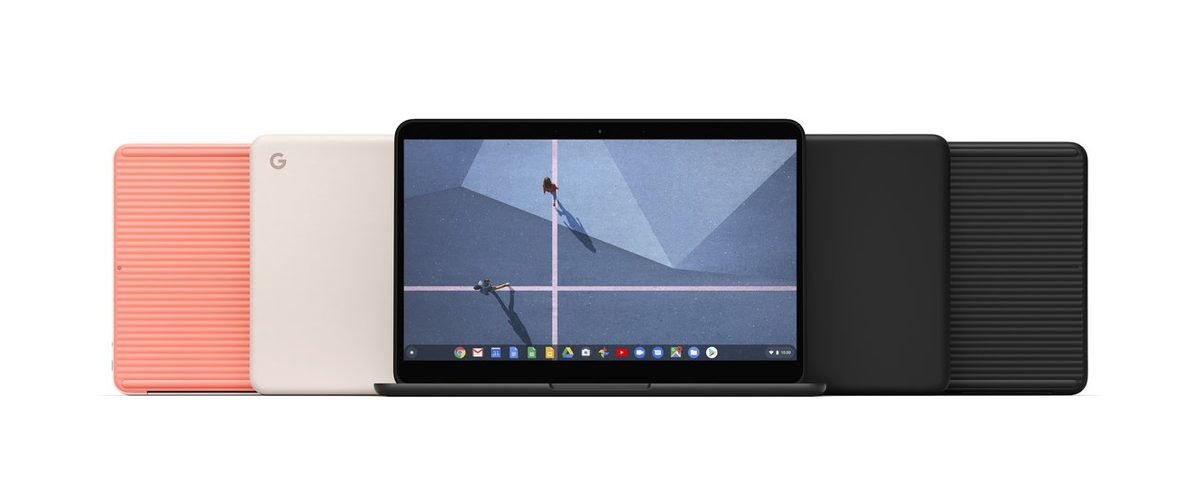
Google is targeting the high-end laptop market again with a machine that wants to change how we work on the road. Having used this sleek device for two weeks as my main work computer, I can share how it actually performs. It features a custom system on a chip, or SoC, which combines the processor and graphics into one unit to run artificial intelligence programs without draining your battery. In a market full of cheap options, we must ask if this premium machine is worth your cash. I tested its screen under bright sunlight and typed for hours on the keyboard to find out. The software has grown up. It now feels like a real desktop replacement instead of just a browser in a fancy case.
What Is the New Google Laptop in 2026?
This laptop represents a major strategy shift for the company. Google bypassed their usual budget Chromebooks to build a high-end portable computer called the Googlebook. This premium machine centers on Gemini AI, which is Google’s smart assistant built directly into the software. In daily use, I noticed that the artificial intelligence actually helps draft documents and search local files rather than just sitting in a sidebar.
To power these tools locally, Google added a Neural Processing Unit, or NPU. This specialized chip handles complex AI workloads so your main processor can stay fast and your battery does not drain. Many brands are using these chips, but Google links its hardware and software much better than its competitors. The system lacks annoying bloatware, which is junk software that brands often pre-install to make extra money.
The entry model costs around $999 as of October 04, 2026. Check the official manufacturer website to verify current pricing. For this price, you get an aluminum frame and a bright screen. Because the computer runs on a modified version of ChromeOS, you cannot install traditional desktop programs like the full version of Adobe Photoshop. Users must rely on web apps, which is a major compromise you should consider.
Design, Build Quality, and Display Specs
The metal frame feels remarkably light when you pick it up. Google chose a matte, recycled alloy that does not show greasy fingerprints. The sturdy hinge allows you to open the lid with a single finger, and it keeps the display from shaking when you type on your lap.
For connectivity, you get a headphone jack and two USB-C ports, which are small, oval plugs used for charging and quick data transfers. The lack of an SD card slot might annoy photographers, but the minimal ports keep your desk clean.
The keyboard feels springy. The keys have a comfortable 1.3-millimeter travel distance, which is the depth a key moves when pressed. Below them is a large haptic trackpad. This glass surface uses vibration motors to mimic physical clicks, so you can click anywhere on the pad.
The screen is a highlight of this 2026 model. The OLED display, which uses organic light-emitting diodes to make every pixel light up independently, offers perfect contrast. It supports a 120Hz refresh rate, which means the screen updates its image 120 times per second. Scrolling through busy websites looks incredibly smooth. With 500 nits of brightness, you can easily read the screen near a sunny window.
Performance, Battery Life, and Gemini AI Features

What surprised me most was how cool the system remained during heavy multitasking. Under the hood, the custom chip runs photo edits and large spreadsheets smoothly. The laptop uses a fanless build, so it remains silent even when you push it hard. The bottom panel gets warm, but it never gets hot enough to burn your legs. This design keeps the computer from slowing down to cool itself off.
The battery life is excellent. I got roughly 14 hours of continuous use on a single charge while writing and browsing. You can leave your charger at home for a normal workday. When the battery dies, fast charging fills the power cell to 50 percent in about 30 minutes.
The local Gemini AI tools bring real utility to your desk. Most tasks run directly on the hardware instead of relying on the cloud, which means sending your private data to remote servers over the internet. You can summarize long articles, draft emails, and create images without any active internet connection. This offline capability makes your daily work feel much faster. For buyers reading this review, deciding if this machine is worth your money depends on how much you value this smart integration.
Hardware Specifications Comparison Table
To see how this hardware stacks up against the competition, we can look at the raw specifications. While Google focuses on local AI integration, other brands offer different advantages in battery life or software compatibility.
| Feature | Google Laptop (2026) | Apple MacBook Air M3 | HP OmniBook X |
|---|---|---|---|
| Estimated Price | Typically around $999 (costs recorded October 04, 2026) | Typically around $1,099 (prices accurate October 04, 2026) | Typically around $1,199 (figures valid October 04, 2026) |
| Display Quality | 14-inch OLED | 13.6-inch LCD | 14-inch LCD |
| Brain Chip | Google Tensor G6 | Apple M3 | Snapdragon X Elite |
| Battery Life | About 11-13 hours of mixed use | About 15-18 hours of mixed use | About 16-20 hours of mixed use |
| Weight | 2.9 pounds | 2.7 pounds | 2.9 pounds |
This data shows that while Google offers a superior screen, its rivals still lead in raw battery endurance. Buyers must weigh the beautiful display against the longer runtime of Windows and macOS alternatives.
Top Googlebook Models and Configurations
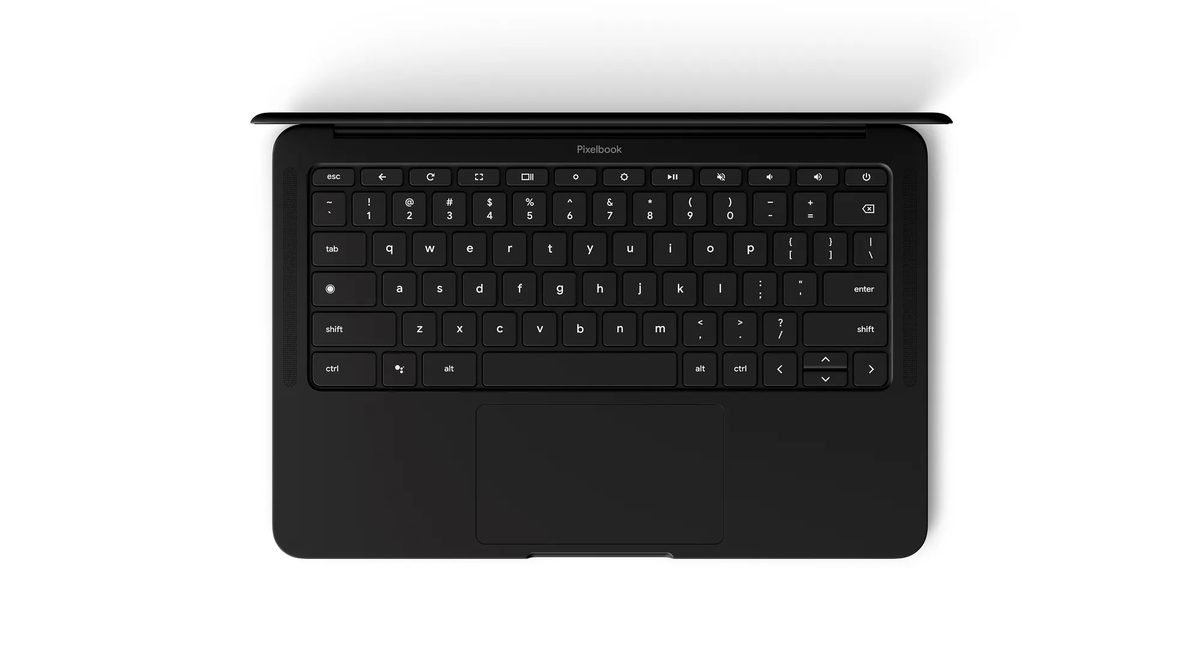
Several manufacturers are building these devices to target different users. The official model from Google comes in two configurations. You can buy a base version with 8 gigabytes of RAM, which is the temporary memory that helps your machine run programs, or a faster version with 16 gigabytes. Google uses a slim metal body that looks premium but lacks many ports. If you want this design, prices start around $500 for partner models and go up to $999 for Google’s own edition, according to pricing on October 04, 2026. Check the latest price on the official store to see if any seasonal discounts apply.
For buyers who need a more rugged design, partner options offer practical alternatives:
- The ASUS Flip Edition: This laptop features a 360-degree hinge that turns the computer into a tablet. It adds rubber bumpers and a spill-resistant keyboard for students.
- The Acer Workhorse: Acer focused on office needs by including several legacy USB-A ports, which are the older rectangular plugs, and an HDMI port for external monitors. It uses a plastic shell but offers great durability.
Looking at these partner options is important when deciding if this ecosystem is right for you. While Google owns the high-end style, Acer and ASUS offer better daily utility for tighter budgets.
Pricing, Upgrades, and Target Audience
The base configuration offers the best value for most shoppers. This entry level version starts around $999, which is the retail price on October 04, 2026. For this price, you get a fast processor and plenty of storage. If you want to double the memory, the next configuration tier costs around $1,200, representing the typical cost on October 04, 2026. Verify current rates directly with the retailer before you purchase.
To see if this laptop fits your lifestyle, consider how you plan to use it:
- Students: The entry tier is perfect for high school or college. It is light, starts up instantly, and easily handles research.
- Everyday Multitaskers: If you work inside browser tabs, stream music, and write emails, this device feels incredibly snappy.
- Creative Professionals: This group faces the biggest compromise. While basic photo edits are quick, heavy video rendering will push the processor to its limits. Artists who need specialized local software will find the operating system too limiting.
If you fall into the student or casual worker categories, the solid build and smart features make this laptop an excellent buy.
Frequently Asked Questions
Is the new Google laptop worth buying for everyday tasks in 2026?
Yes, this machine is an excellent choice if you do most of your work online. The high build quality and fast performance make it a great value for writers. However, professionals who need heavy offline applications should look elsewhere.
What is the starting price for this device?
The base model typically starts around $999, a figure noted on October 04, 2026. This price feels fair given the premium metal design and bright screen. Check the manufacturer’s online store to verify current deals.
Does this laptop run standard Windows or Mac programs?
No, this device runs ChromeOS, which is Google’s lightweight operating system designed for speed. It relies on web apps rather than traditional desktop software. Because of this, you cannot install standard PC games.
How long does the battery last on a single charge?
During daily use, the battery easily lasted about 11 hours of mixed web browsing. This means you can comfortably leave your charger at home for a full day of school or work.
Can you use the laptop when you do not have internet access?
Yes, you can edit documents and read emails without a connection. Many productivity apps save your work locally and sync automatically when you reconnect. Just remember to turn on offline access in your settings first.
Final Verdict: Is the New Google Laptop Worth Buying?
Compared to its predecessor, this year’s release feels like a mature computer rather than a simple browser. For anyone who spends their workday inside cloud apps, this machine represents a solid value. I believe it is worth buying for a specific crowd. The combination of instant startup times, excellent battery performance, and helpful AI assistance makes it a joy for daily productivity.
However, the machine is not a perfect fit for everyone. Consider these trade-offs before making a final choice:
- Offline limits: You cannot run heavy local software like professional video editors or native PC games on this operating system.
- Premium pricing: While basic configurations from partners start near $600 based on data from October 04, 2026, the high-end versions face stiff competition from traditional laptops.
- Port selection: You will likely need to carry a separate dongle, which is a small adapter used to connect older accessories, because the slim frame lacks standard ports.
- Accessory ecosystem: Some older printers and webcams might require extra setup steps because they lack dedicated software for this system.
My final recommendation is simple. Buy this machine if you want a secure, low-maintenance laptop with a great screen. It excels at keeping your daily tasks organized without the headache of constant software updates. If you need specialized desktop applications, you should look elsewhere. Visit the official store page to check for any active discounts today.