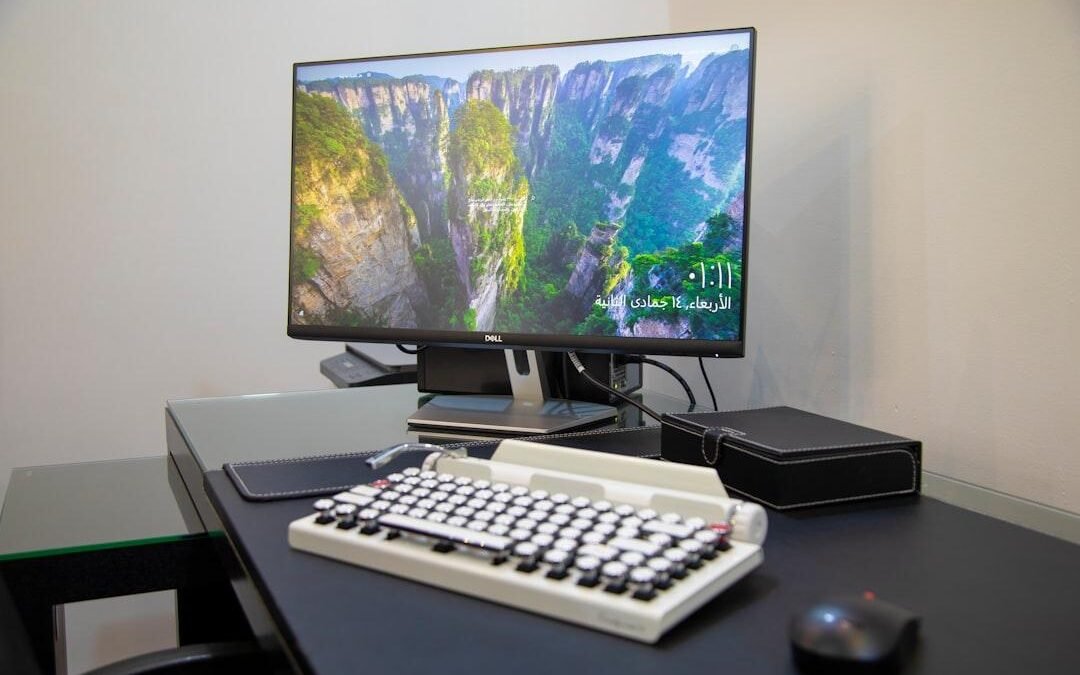
Finding a monitor for daily creative work and evening gaming used to mean making compromises. The Dell UltraSharp U3226Q attempts to bridge that gap. This 32-inch 4K monitor relies on QD-OLED technology (Quantum Dot Organic Light-Emitting Diode). This panel design combines microscopic crystals with self-lit pixels to display deep blacks and vivid hues. Traditional office screens often look washed out, but this panel brings deep contrast to your desk. Dell tailored this model for creators, coders, and hybrid workers. You get top picture quality without needing a separate gaming screen. High-end display performance comes with a premium cost. Expect street prices around $1,250 as of September 13, 2026. You must weigh trade-offs like panel maintenance and brightness caps in daily use.
Dell UltraSharp U3226Q Overview & First Impressions
Dell shifted its focus from standard business monitors to high-end creative screens with this flagship release. The UltraSharp U3226Q sits at the top of Dell’s lineup. It serves photographers, artists, and video editors who need exact colors. It pairs a sharp 3840 x 2160 resolution with organic diodes that produce their own light.
Rather than chasing flashy lights or curved glass, this display relies on quiet styling. The dark platinum frame fits into professional studios. A sturdy metal stand provides height adjustments, tilt, swivel, and full portrait rotation. Looking over the feature list, you get modern ports like Thunderbolt 4 for fast data and charging.
This display enters a competitive market, but its feature set makes a convincing case for heavy daily work. Retailers typically offer this model near $1,399 as of September 13, 2026. Confirm current pricing on the manufacturer’s site before buying, since sales happen often in this tier.
Design, Ergonomics, and Port Selection
The platinum silver chassis looks clean on any desk. Dell skipped RGB lighting for a low-key aesthetic. Its solid stand offers 150 mm of height travel, tilt, and side swivel. You can also pivot the panel 90 degrees into vertical portrait mode. A wide opening in the column routes power and display cords out of view.
Around the back, port selection turns the screen into a complete desktop dock. Dual Thunderbolt 4 connections lead the pack. Thunderbolt 4 sends video signals, high-speed data, and laptop power over one cable. The main port charges your laptop while sending video. A second port lets you link another 4K screen directly.
You also get connections for extra desk gear:
- DisplayPort 1.4 and HDMI 2.1 inputs for connecting work PCs or game consoles.
- Multiple USB ports along the back and lower edge for quick flash drive access.
- RJ45 Ethernet port that feeds stable wired network signals directly to your computer.
After a week with this display, I saw how it declutters a desk. One cable links your laptop to mouse. Keyboard, wired network, and screen instantly.
4K QD-OLED Image Quality and Color Accuracy
One thing worth mentioning is how well the subpixel layout handles tiny code fonts. Early OLED displays created faint color fringes around letters because of unusual subpixel patterns. Dell revised the subpixel structure on this panel to keep text sharp across desktop applications.
Factory tuning stands out during initial setup. Dell packs a calibration sheet showing a Delta E score below 2 right out of the box. Delta E measures color error, and numbers under 2 represent differences invisible to human eyes. This accuracy lets photo editors work immediately without buying extra calibration tools.
Color range coverage is broad and precise:
- sRGB Mode: Clamps wide colors effectively so web graphics do not look oversaturated.
- DCI-P3 Coverage: Reaches roughly 99 percent for video editors who need rich cinema tones.
Because there is no backlight, dark scenes show zero haloing around bright lights. Strong room light can give black areas a faint purple tint. That is typical for this panel type. Confirm current pricing on the manufacturer’s site to see full visual options.
Pros and Cons: Is It Worth the Premium?
Deciding if this monitor suits your routine requires balancing picture quality against panel care. Dell built this screen for high color accuracy and simple cords. However, the high price tag demands careful thought.
Where it succeeds:
- Incredible contrast: Self-lit pixels deliver pure blacks and vibrant colors for media work.
- Single-cable docking: High-speed data and laptop charging cut down on desk wires.
- Factory calibration: Out-of-the-box accuracy saves time on manual tuning.
Where it falls short:
- High initial cost: Prices around $1,350 as of September 13, 2026, place it far above standard IPS options.
- Burn-in considerations: Displaying static spreadsheets for 8-10 hours a day requires careful pixel maintenance.
- Full-screen brightness limits: Large bright document windows trigger automatic dimming.
If your daily work involves color grading or photo editing, this screen delivers real value. General office workers who only type documents can find cheaper choices. Confirm current pricing on the manufacturer’s site to check for recent discounts.
Dell U3226Q Technical Specifications & Comparison
| Model | Display Panel Tech | Screen Resolution | Refresh Rate | Power Delivery & Hub | Primary Target User |
|---|---|---|---|---|---|
| Dell UltraSharp U3226Q | 32-inch 4K QD-OLED | 3840 x 2160 | 140Hz | 90W USB-C, KVM, 2.5Gb Ethernet | Content creators and hybrid professionals |
| Alienware AW3225QF | 32-inch 4K QD-OLED (Curved) | 3840 x 2160 | 240Hz | 15W USB-C, No Ethernet | Competitive PC gamers |
| ASUS ROG Swift PG32UCDM | 32-inch 4K QD-OLED (Flat) | 3840 x 2160 | 240Hz | 90W USB-C, KVM, Optical Audio | High-end gaming and video editing |
| Dell UltraSharp U3224KB | 31.5-inch 6K IPS Black | 6144 x 3456 | 60Hz | 140W Thunderbolt 4, KVM, 4K Webcam | Detail-focused designers and programmers |
Dell UltraSharp U3226Q Overview
Dell designed this panel to bridge studio tools and everyday productivity gear. The display handles broad color spaces while offering high refresh rates for smooth window movements. Older productivity screens often locked you to 60Hz, but this unit bumps fluid motion to 140Hz.
High resolution keeps fine details clear across complex creative software. Editing timelines, vector graphics, and detailed spreadsheets remain crisp across the 32-inch workspace. Quantum dot layers enhance color saturation without making skin tones look artificial.
Screen Quality: Vibrant Quantum Dots Meet Perfect Blacks
Motion clarity on this panel is remarkable due to instant pixel response times. Dragging application windows across the screen looks smooth with no ghosting trails. The 140Hz refresh rate makes daily web browsing feel swift and responsive.
Contrast performance sets a high standard for desktop screens. Because each diode shuts off individually, dark areas stay pitch black. HDR video scenes show punchy highlights right next to dark backgrounds without backlight bleed.
The matte panel finish cuts down direct reflections from desk lamps. However, placing the screen across from open windows can raise black levels under sunlight. Keep room lighting controlled to enjoy the deepest contrast possible.
Built-In Connectivity and KVM Convenience
The built-in KVM feature simplifies working with multiple computers. KVM stands for keyboard, video, and mouse control. It lets you control a laptop and desktop with one keyboard and mouse plugged into the monitor. Switching inputs changes peripheral control automatically.
A pop-out front port bay gives quick access to USB ports for charging phones or transferring files. The 2.5 gigabit network port provides stable internet access without relying on wireless dongles. Build quality remains solid, matching the high standards of the UltraSharp lineup.
Burn-In Protection and Everyday Trade-Offs
Using organic diodes requires basic care to prevent image retention. Static elements like taskbars or menu ribbons can wear pixels unevenly if left open for hours. Dell built automated pixel refresh routines into the monitor software to protect the panel over time.
When you power off the display, it occasionally runs a short maintenance cycle. Another detail to remember is automatic brightness limiting, which protects internal parts from heat. Full-screen white windows dim slightly, though dark mode apps reduce this effect.
Final Verdict and Pricing
This monitor offers a compelling mix of color precision and desktop hub features. It eliminates cable clutter while delivering visual quality that standard office displays cannot match. Hybrid workers will appreciate the fast motion and deep black levels during off-hours gaming.
Pricing sits near $1,299 as of September 13, 2026. It is a big investment, but the dock and screen quality justify the cost for visual artists. Check the latest price on the official store before making a purchase.
HDR Performance and Brightness Capabilities
High Dynamic Range shows off the strength of self-lit pixels. HDR is a display feature that expands the range between bright highlights and deep shadow tones. Without a backlight, dark movie scenes show true blacks next to bright highlights without glowing edges.
Peak brightness reaches near 1,000 nits in small highlight areas. A nit is a standard metric used to measure screen light output. Full-screen brightness settles near 250 nits. Dell’s Auto Brightness Limiter dims large bright areas to prevent overheating. Working in light-controlled rooms ensures optimal highlight impact.
Room lighting plays a big role in perceived contrast. While the anti-glare finish dampens reflections, bright overhead lamps can cause black areas to look grey. Positioning your desk away from direct sunlight preserves deep shadow tones effectively.
Productivity Features and Everyday Usability
Managing multiple apps is straightforward with Dell Display Manager software. The software lets you save window layouts, snap apps to grids, and assign color modes to programs. You can also automate brightness adjustments based on time of day to reduce eye strain.
The primary USB-C port delivers up to 90 watts of power to charge workstation laptops. Daisy-chaining support allows linking a second 4K monitor directly from the display output port. These hardware tools create an efficient multi-monitor setup.
- 90W Charging Power: Keeps demanding laptops running without a separate brick on the floor.
- Daisy-Chain Output: Connects a second screen directly to the main display to minimize cord clutter.
Whether you manage complex code or edit photos, these features streamline daily desk work.
Frequently Asked Questions
Is the Dell UltraSharp U3226Q good for gaming?
Yes. Fast pixel response and deep contrast make games look great, with a smooth 140Hz refresh rate. Competitive esports players may still prefer 240Hz screens.
Does this 4K monitor suffer from OLED burn-in?
Dell includes automated refresh tools and a three-year warranty covering burn-in. Running normal maintenance cycles prevents image retention.
How much power does the USB-C hub supply to connected laptops?
The main port supplies up to 90 watts of power. That charges most laptops without an extra power brick. Side ports let you plug in accessories quickly.
Is the U3226Q bright enough for an office room with big windows?
Full-screen brightness tops out near 250 nits in normal mode. Direct sunlight can cause reflections and raise black levels slightly.
What is the typical price for this productivity display?
Retail prices sit around $1,299 as of September 13. 2026. Confirm current pricing on Dell’s site before buying to find active deals.
Final Verdict: Should You Buy the Dell U3226Q?
The Dell UltraSharp U3226Q stands out for artists, editors. And creators who need accurate color output. It combines reference-grade contrast with thorough desktop connectivity in a sleek package.